Getting started
Query the yBot data platform programmatically — which creators talk about an ingredient, share of voice for a brand, sentiment by category, audience demographics — across YouTube, TikTok and Instagram.
https://partners.yourbrandontime.comX-API-Key header · JSON in / JSON out1. Get your API key
API keys are self-service. Open Profile → API keys. You'll see your access — key type, your plan's monthly quota, the per-minute burst and how much you've used this month — plus your existing keys. Click Create new key.
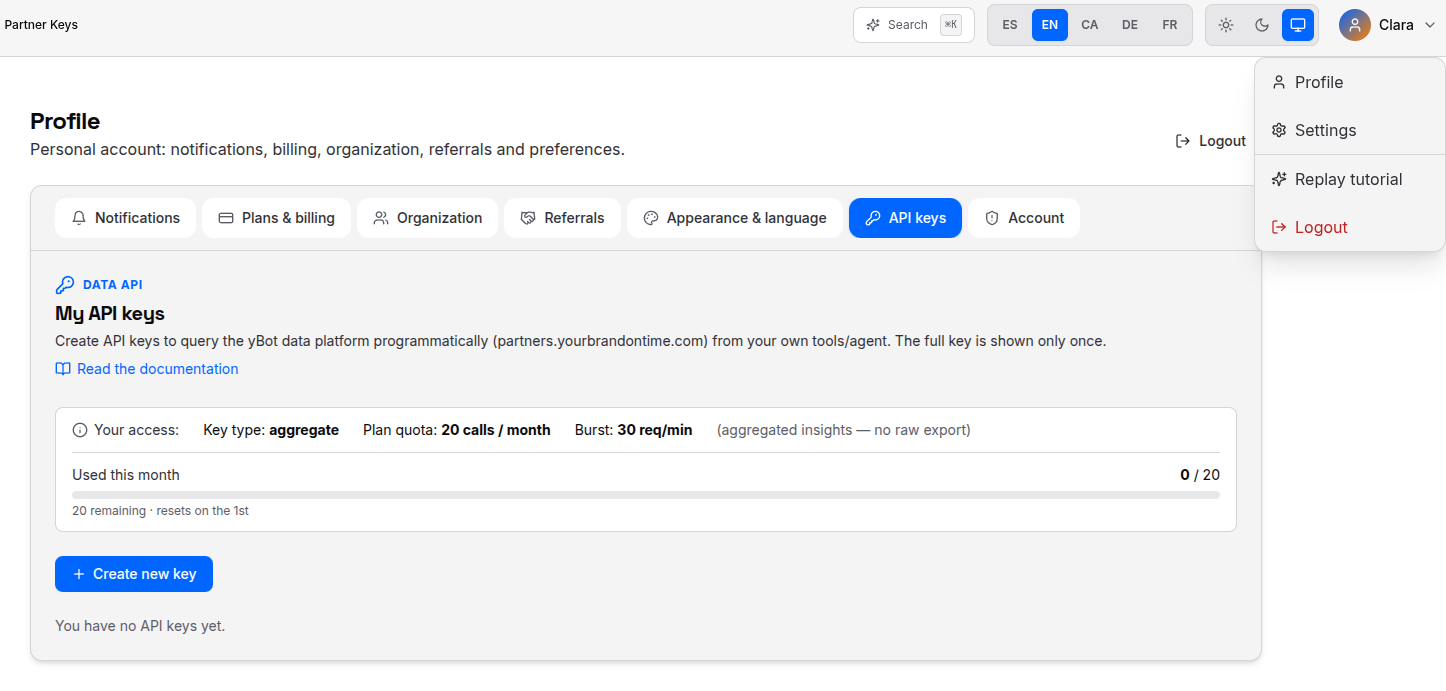
The full key is shown once. Copy it now and store it securely — it cannot be retrieved again (only its prefix is shown afterwards).

From the table you can later rotate (replace) or revoke a key, using the actions on the right.

No API access? If your plan doesn't include the Data API the page shows “Your plan does not include API access”. Upgrade your plan or ask an admin to enable it.
2. Authentication
Send your key in the X-API-Key header on every request:
curl https://partners.yourbrandontime.com/v1/schema \
  -H "X-API-Key: YOUR_API_KEY"
Status codes: 401 missing key · 403 invalid/revoked/insufficient · 429 rate limit exceeded · 400 bad request · 503 backend unavailable.
3. Your first call
Ask an open question — “which creator talks most about retinol?” — with /v1/aggregate:
curl -s -X POST https://partners.yourbrandontime.com/v1/aggregate \
  -H "X-API-Key: YOUR_API_KEY" -H "Content-Type: application/json" \
  -d '{
    "index": "siv_business_ideas",
    "filters": { "components": "retinol" },
    "group_by": "channel_name",
    "metric": { "type": "count" },
    "size": 10
  }'
See the API reference for every endpoint, or Use with an AI agent to ask questions in natural language.